

概念了解 Oracle: Oracle数据库的概念和其它数据库不一样,这里的数据库是一个操作系统只有一个库。可以看作是 Oracle 就只有一个大数据库。 实例: 一个 Oracle实例(OracleInstance)有一系列的后台进程(BackguoundProcesses)和内存结构(M
 2024-11-18
oracle12c单节点部署 环境情况 linux环境: #cat /etc/redhat-release CentOS Linux release 7.9.2009 (Core) oracle版本: 12.2.0.1 下载地址:Oracle12c linux-server下载
2024-11-15

视频教程 新版Oracle19C入门到熟练_哔哩哔哩_bilibili 学习要求 有一定关系型数据库知识储备 教学目标 掌握关系型数据库理论, 了解Oracle相关 数据库概念 数据库 数据库是按照某种数据结构来组织、存储和管理数据的仓库。是一个长期存储在计算机内的、
2024-11-14
MySQL自增长与Oracle序列的区别: 自增长只能用于表中的其中一个字段 自增长只能被分配给固定表的固定的某一字段,不能被多个表共用. 自增长会把一个未指定或NULL值的字段自动填上. 在mysql中添加序列,请看下面的实例: 在MYSQL里有这样一张表: CREATE TABLE
2024-11-12
Oracle如何设置主键自增 Oracle 无法直接设置逐渐自增 只能通过设置序列 设置触发器来实现主键自增流程如下 创建一个表 预留主键字段ID CREATE TBALE TEST( ID INT PRIMARY KEY, NAME VARCHAR(40) WORD1 VA
2024-11-11
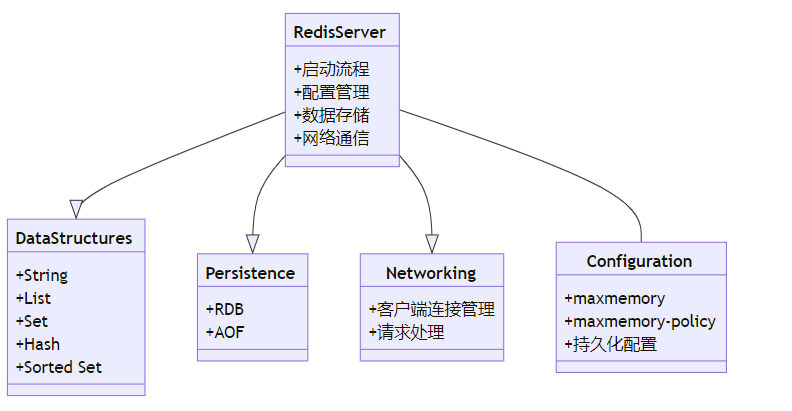
Redis依赖关系查询方案 Redis是一个高性能的键值存储系统,广泛用于缓存、消息队列、排行榜等场景。在开发和维护过程中,了解Redis的依赖关系对于优化性能、排查问题非常重要。本文将介绍如何查询Redis的依赖关系,并通过代码示例和类图来具体说明。 1. Redis依赖关系概述 Redis
2024-10-22
mysql 删除数据库 所有表 数据库中有时需要删除所有的表或者表中所有内容,下面介绍几种常见的操作。 一、删除所有表 使用 Navicat 工具直接在界面中删除 逐个删除——直接使用删除表的SQL语句 DROP TABLE IF EXISTS table_name;
 2024-10-09
前言 最近创建了一张表,用于保存名称相关信息。 刚开始是没有加任何索引,数据不多时查询也没什么问题。 等到了表有5千多条记录后,查询变得很慢,设置需要二十多秒。 一起来看下这个博主是如何解决的?或者你们是否有更好的解决方案呢?也欢迎评论区留言。 单字段查询 刚开始给status字段设
2024-09-13
以下是一些提供Redis Windows版本下载的国内镜像或资源: 1. 清华大学开源软件镜像站: 访问地址:https://mirrors.tuna.tsinghua.edu.cn/ 在搜索框中输入“Redis”,然后选择相应的版本进行下载。 2. 中国科技大学开源软件镜像: 访问地
2024-09-11
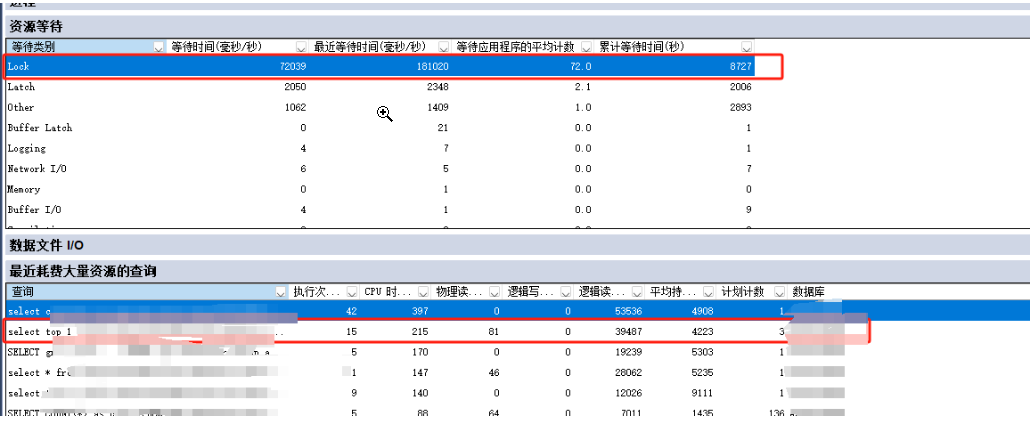
1. 基本知识 在 SQL Server 中,死锁是指两个或多个进程互相等待对方持有的资源,从而无法继续执行的现象 要解决死锁问题,首先需要识别并分析死锁的发生原因,然后采取相应的措施来预防和处理死锁 识别死锁的常用方法有以下几种: 使用 SQL Server Profiler:
2024-09-10