
组网需求
如图1所示,Switch上只有一个以太网接口10GE1/0/1,需要切换为新的局域网,新的局域网中的计算机所属的网段为172.16.1.0/24,则需要修改该Switch的接口IP地址。
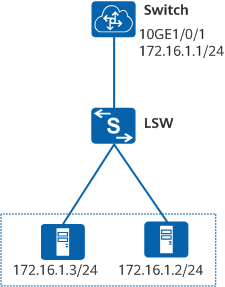
操作步骤
- 配置Switch的10GE1/0/1接口的IP地址。
<HUAWEI> system-view
[~HUAWEI] sysname Switch
[*HUAWEI] commit
[*Switch] interface 10ge 1/0/1
[*Switch-10GE1/0/1] ip address 172.16.1.1 24
[*Switch-10GE1/0/1] quit
[*Switch] commit
- 验证配置结果。
# 从Switch上Ping网段172.16.1.0内的主机,可以Ping通。
<Switch> ping 172.16.1.2
  PING 172.16.1.2: 56  data bytes, press CTRL_C to break
    Reply from 172.16.1.2: bytes=56 Sequence=1 ttl=254 time=1 ms
    Reply from 172.16.1.2: bytes=56 Sequence=2 ttl=254 time=1 ms
    Reply from 172.16.1.2: bytes=56 Sequence=3 ttl=254 time=1 ms
    Reply from 172.16.1.2: bytes=56 Sequence=4 ttl=254 time=1 ms
    Reply from 172.16.1.2: bytes=56 Sequence=5 ttl=254 time=1 ms

  --- 172.16.1.2 ping statistics ---
    5 packet(s) transmitted
    5 packet(s) received
    0.00% packet loss
    round-trip min/avg/max = 1/1/1 ms